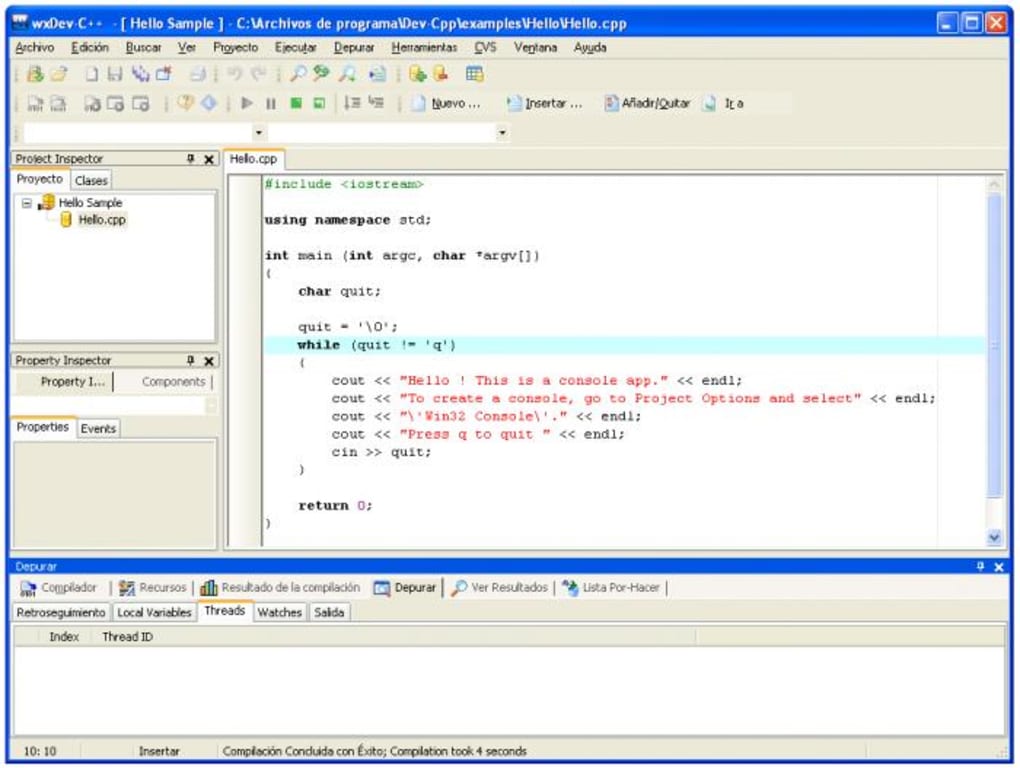
Screenshots


App details
- Version
- 7.4.2.542
- Size
- 123.18 MB
- Updated
- September 28, 2018
- Requires
- Windows Vista
- Language
- English | Arabic | Czech | Danish | Germ...
- License
- Free
- Developer
- guru-kathiresan
- Category
- Windows OS
SoftPas in:
This product is also available in the following languages:
About wxDev C
Download wxDev C – free IDE, RAD tool, wxWidgets visual designer
Overview
wxDev C is an open‑source upgrade to the classic Dev‑C++ environment, created by Colin Laplace and a community of contributors. While Dev‑C++ already offered a lightweight, Windows‑focused C/C++ IDE, wxDev C takes the concept a step further by integrating a visual form designer that works natively with the wxWidgets library. This means developers can build native‑look Windows dialogs, frames, and complete GUIs without hand‑coding every widget. The IDE remains free, secure, and actively maintained, delivering a modern RAD (Rapid Application Development) experience for hobbyists, students, and professional programmers alike.
At its core, wxDev C bundles the familiar Dev‑C++ code editor, compiler shortcuts, and debugging tools, but adds a powerful drag‑and‑drop interface that generates wxWidgets C++ code behind the scenes. The software supports a range of compilers, including MinGW and several Microsoft Visual C++ versions (6, 2003, 2005, 2008), and works seamlessly with source‑control formats such as CVS. Project templates, a DevPaks manager for external libraries, and built‑in handling of static libraries and DLLs make it a comprehensive toolbox for creating both simple console utilities and full‑blown GUI applications.
Whether you are migrating an existing Dev‑C++ project to a modern UI framework or starting a new cross‑platform application from scratch, wxDev C provides the visual ergonomics of a RAD environment while preserving the low‑level control that C++ developers expect. Its free licensing model eliminates cost barriers, and the community‑driven update cycle ensures regular bug fixes, new widget support, and performance improvements. In short, wxDev C stands out as a niche but highly valuable bridge between classic C++ development and contemporary GUI design.
Key Features
- Integrated wxWidgets Form Designer: Drag‑and‑drop creation of dialogs, frames, and controls with instant C++ code generation.
- Multi‑Compiler Support: Works with MinGW, Microsoft Visual C++ 6, 2003, 2005, and 2008, giving flexibility for legacy and modern toolchains.
- Robust Debugging Mode: Breakpoint management, variable watches, and call‑stack navigation directly within the IDE.
- Task Editor & Project Templates: Pre‑defined templates for console apps, GUI apps, static libraries, and DLL projects accelerate project setup.
- DevPaks Manager: One‑click installation of third‑party libraries, headers, and add‑on components for wxWidgets and other frameworks.
- Source Control Integration: Native support for CVS, allowing teams to version their code without leaving the IDE.
- Static Library & DLL Management: Simple UI for creating, linking, and deploying static libraries and dynamic link libraries.
- Fast Project Creation: Streamlined wizard guides users through creating Windows or console applications in seconds.
- Cross‑Platform Potential: While primarily a Windows IDE, the generated wxWidgets code can be compiled on macOS, Linux, and Android with minimal changes.
- Free and Open Source: No licensing fees, full source access, and a community‑driven roadmap ensure long‑term viability.
Installation & Usage Instructions
Installing wxDev C is straightforward, and the process is designed to keep the barrier to entry low for both beginners and seasoned developers. Follow these steps to get the IDE up and running:
- Download the Installer: Visit the official wxDev C download page and click the “Download for Windows (64‑bit)” button. The file is typically named
wxdevc‑setup.exeand is under 30 MB. - Run the Installer: Double‑click the executable. The installer will request administrative privileges; grant them to allow the program to write to
Program Filesand add file associations. - Choose Installation Path: The default location
C:\Program Files\wxDevCworks for most users. If you have a custom workspace, select a folder where you store source code. - Select Components: You can install the core IDE, the MinGW compiler bundle, and optional DevPaks manager. If you already have a preferred compiler (e.g., Visual C++), you may deselect the MinGW bundle.
- Finish Setup: Click “Install”. The installer will copy files, register file extensions (.cpp, .h), and create start‑menu shortcuts.
- First Launch: Open wxDev C from the desktop shortcut. On first run, the IDE will prompt you to configure the default compiler. Browse to the
binfolder of MinGW or the Visual C++ installation directory. - Create a New Project: Use File → New → Project and select “wxWidgets GUI Application”. The wizard asks for a project name, target directory, and the base class (usually
wxFrame). - Design the Interface: The Form Designer opens automatically. Drag controls (buttons, text fields, list boxes) from the toolbox onto the canvas. Use the property grid to adjust labels, IDs, and event handlers.
- Generate Code: As you modify the form, wxDev C updates the underlying
.cppand.hfiles in real time. You can switch to the code view at any moment to fine‑tune the logic. - Build & Run: Press F9 or click the “Compile & Run” toolbar button. The IDE compiles the project, links the wxWidgets libraries, and launches the executable.
- Debugging: Set breakpoints by clicking the left gutter in the code editor. When you run the program in debug mode, wxDev C halts execution at each breakpoint, allowing you to inspect variables and step through code.
For macOS or Linux users, wxDev C can be run via Wine, or you can download the source code from the GitHub repository and compile it manually. The generated wxWidgets code is portable, so after the initial Windows build you can re‑compile on any platform that supports wxWidgets and your chosen compiler.
Compatibility & System Requirements
wxDev C is primarily built for Windows 7, 8, 10, and 11 (both 32‑bit and 64‑bit). The IDE itself runs on any modern Windows environment with .NET Framework 4.5 or higher. While the application is not natively packaged for macOS or Linux, the generated C++ code can be compiled on those platforms using wxWidgets, MinGW‑w64, or native compilers such as clang or GCC. For users who need a Linux‑based workflow, running wxDev C under Wine provides a functional experience, though performance may vary depending on the Wine version.
Minimum hardware requirements:
- CPU: 1 GHz or faster (dual‑core recommended)
- RAM: 2 GB minimum, 4 GB recommended for smooth debugging
- Disk Space: 150 MB for the IDE, plus additional space for projects and libraries
- Graphics: Any DirectX‑compatible graphics adapter (the IDE uses standard GDI for UI)
Recommended configuration for professional development:
- CPU: Quad‑core 2.5 GHz or higher
- RAM: 8 GB or more (especially when working with large codebases or multiple debugging sessions)
- SSD storage for rapid compile times
- Full HD (1920×1080) monitor or larger for comfortable form‑designer layout
Because wxDev C relies on external compilers, ensure that your chosen compiler version matches the architecture of your operating system. For example, use the 64‑bit MinGW distribution on a 64‑bit Windows installation to avoid linking issues. The IDE also detects installed Visual C++ redistributables automatically, simplifying setup for developers who already have Microsoft development tools on their machines.
Pros and Cons
Pros
- Free and open source – No hidden fees or trial periods.
- Visual wxWidgets designer – Saves time compared to hand‑coding GUIs.
- Broad compiler support – Works with MinGW and multiple Visual C++ versions.
- Integrated debugging – Breakpoints and variable inspection without leaving the IDE.
- DevPaks manager – Easy installation of third‑party libraries and extensions.
- Lightweight footprint – Faster startup than heavyweight IDEs like Visual Studio.
- Active community – Frequent updates, bug fixes, and user‑contributed templates.
Cons
- Limited native support for macOS and Linux – Requires Wine or manual compilation for non‑Windows platforms.
- Interface feels dated compared to modern IDEs; lacks dark‑mode theme.
- Advanced C++ features (e.g., C++20 modules) are not fully supported.
- Form Designer generates code that can be verbose, requiring occasional cleanup.
- Documentation is community‑driven; official manuals are sparse.
FAQ
Is wxDev C completely free or does it have hidden costs?
wxDev C is released under the GPL‑2.0 license, which means it is 100 % free for personal, educational, and commercial use. There are no hidden licensing fees, and you can download, modify, and redistribute the software without restriction.
Can I use wxDev C to develop cross‑platform applications?
Yes. While the IDE runs on Windows, the wxWidgets code it generates is portable. You can compile the same source files on macOS, Linux, Android, or iOS using the appropriate wxWidgets libraries and a compatible C++ compiler.
What compilers are compatible with wxDev C?
wxDev C works with the bundled MinGW compiler and with Microsoft Visual C++ 6, 2003, 2005, and 2008. You can also point the IDE to newer Visual Studio toolchains or external GCC/Clang installations, provided they are correctly configured in the preferences.
How does the Form Designer generate code, and can I edit it?
The Form Designer creates C++ classes derived from wxWidgets base classes (e.g., wxFrame, wxDialog). It writes the UI layout into the .h and .cpp files, preserving event‑handler stubs. Developers can edit these files directly to add custom logic, and the designer will retain user modifications as long as you keep the generated sections intact.
Is there any support for version control systems other than CVS?
Out of the box, wxDev C includes CVS integration. However, because the IDE is essentially a standard text editor, you can use external Git, Subversion, or Mercurial clients alongside it. Some community‑made plugins add direct Git support, and the DevPaks manager can be extended to include version‑control tools.
Conclusion & Call to Action
wxDev C delivers a compelling blend of classic Dev‑C++ simplicity and modern wxWidgets visual design. For developers who value a lightweight, free IDE that accelerates GUI creation without sacrificing low‑level C++ control, it remains one of the best‑valued tools in the open‑source ecosystem. While the Windows‑centric nature and modest UI polish may deter some, the overall feature set—especially the integrated Form Designer and DevPaks manager—makes it a solid choice for students, indie developers, and teams building cross‑platform applications on a budget.
Ready to give wxDev C a try? Download the latest version now, explore the visual designer, and start building your next wxWidgets project today. Remember, because the software is free and open source, you can also contribute to its roadmap, suggest features, or submit bug fixes on the GitHub repository. Happy coding!
Guides & Tutorials
How to install wxDev C
- Click the Download button above.
- Once redirected, accept the terms and click Install.
- Wait for the wxDev C download to finish on your device.
How to use wxDev C
This software is primarily used for its core features described above. Open the app after installation to explore its capabilities.
User Reviews
No reviews yet. Be the first to share your experience.
You may also like
more
Llama 2
Free-to-use large language model As the new addition to Meta’s arsenal of langua...

NotebookLM
Revolutionizing the note-taking and idea-generation process NotebookLM is an exp...

Github co pilot
AI-inspired software development and coding platform GitHub Copilot is a browser...

Google Gemma
Google’s lightweight AI models Introducing Google Gemma , a family of cutting-ed...

AI Image Enlarger
A free app for Windows, by ai-image-larger. AI Image Enlarger is a free software...

DALL E
AI-driven text-to-image transformation engine DALL·E is a free graphic and desig...